quire

Quire
A writing notebook for stories, in one HTML file. Open it in a browser and start writing. No account, no install, and it works offline.
Try it online · Download quire.html · Tutorial · What’s new
Private by design
Your writing stays in the file and in your browser. Quire sends nothing anywhere, has no tracking or analytics, and only goes online if you switch on Google Fonts. The whole program is plain JavaScript inside the file, with no outside code, so you can read every line of it.
The file also carries a security rule that your browser enforces: quire.html may reach only Google Fonts (if you turn them on). Anything else, such as a hidden script trying to send your text somewhere, is blocked. See What can the file connect to?
If you like, Quire encrypts your backups and the saved file with a password (AES-256), so a lost laptop or a shared cloud folder doesn’t give your writing away. With the file encrypted, the working copy Quire keeps in your browser is encrypted too.
Getting started
- Download
quire.htmland keep it where you keep your writing. - Open it in your browser (double-click the file).
- Start a story, or open the example story to see every feature with something in it.
- Save file (Ctrl+S, or ⌘S on a Mac) writes everything into the HTML file itself. That file is your notebook: back it up like any other document.
How saving works, in short:
- While you write, Quire keeps your work in this browser’s storage, so nothing is lost if the tab closes.
- Save file stores everything inside
quire.html. In Chrome and Edge you choose the file once and later saves overwrite it. In Firefox and Safari each save downloads an updated copy, which lands in your Downloads folder unless you tell the browser otherwise. In Firefox, turn on Settings → General → Files and Applications → Always ask you where to save files, then pick your Quire file each time and confirm replacing it. A reminder nudges you when work has gone unsaved for a while. - Backups (Options → Saving and backups) save one story or all of them as a
.jsonfile, which any copy of Quire can restore. - Encryption (Options → Encryption, optional) locks backups and the saved file, and the browser’s copy of it, with a password. A meter rates the password as you choose it. Forget the password and the writing can’t be recovered, so keep it safe.
- The online version keeps your work in that browser only. To keep your writing safe, download the file and use Save file.
- On a phone, opening the file from an app such as Dropbox gives the browser a temporary link, so Save file saves a new copy under the name you last used. Save it over the old file, or delete the old one, so there’s only one notebook.
Features
Writing
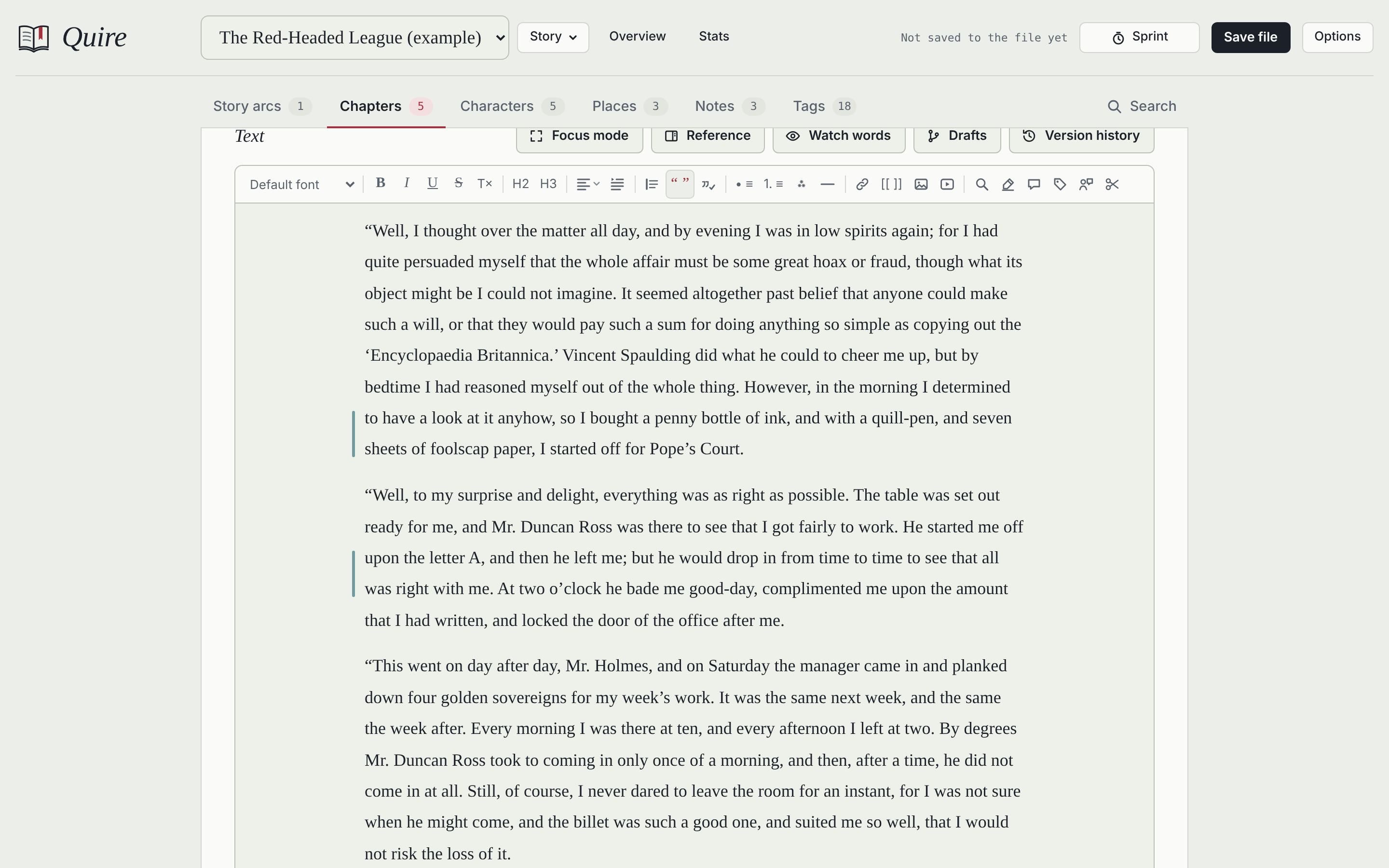
- A clean editor with headings, quotation blocks, lists, scene breaks, alignment and a choice of fonts
- Book-style paragraph indents, plus smart quotes (English, German or French style), em dashes and ellipses as you type
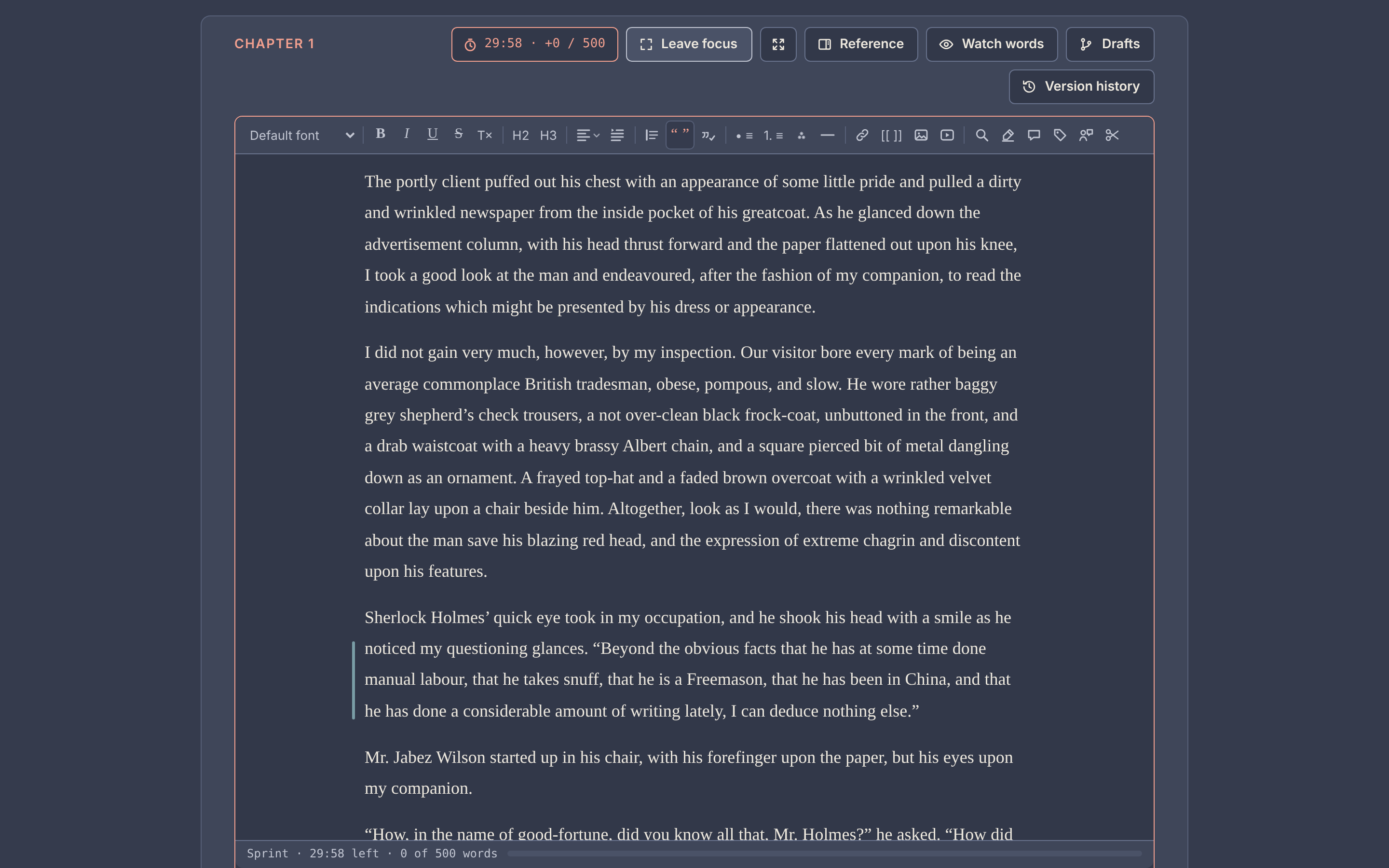
- Focus mode in two stages: Focus hides the navigation; Intense focus leaves only the text, its toolbar and the buttons above it. On larger screens, full screen hides the browser’s own bars too.
- Picks up where you left off: Quire reopens the chapter you were writing, at the spot where you stopped
- A reference panel keeps a character, place, note or another chapter beside the text while you write, and Go to (Ctrl+K) jumps to any entry, tag or command in a few keystrokes
- Typewriter scrolling, adjustable text size and page width, six themes from light to a warm dark, and your own themes from four colors
- Writing sprints with a timer, a word goal and a chime; a progress bar at the bottom of the screen during sprints, toward a chapter’s word target, or toward today’s share of a deadline
- Word targets per chapter and for the whole story, a deadline that works out the words a day it takes, a daily or weekly word goal, a word count for any selection, and find and replace in one chapter, all chapters or everything
- Back to where you were: after following a link, a tag or a search result, one click (or the browser’s Back button) returns you to the same spot
Drafts and history
- Drafts: try out changes in a copy of a chapter, then merge them change by change. A merge can be undone.
- Version history: replay how a chapter was written, compare versions and name the important ones
- Milestones: name the current version of every chapter at once (“Draft 2 finished”), then compare a chapter with it or bring a chapter back
- Trim version history when a stage is done: keep one version per day or per week, or only the named ones
- Undo (Ctrl+Z) for typing and for Quire’s own changes: marks, tags, comments, alignment and more
Planning
- Sheets for the story, chapters, characters, places and notes, with portraits and place images
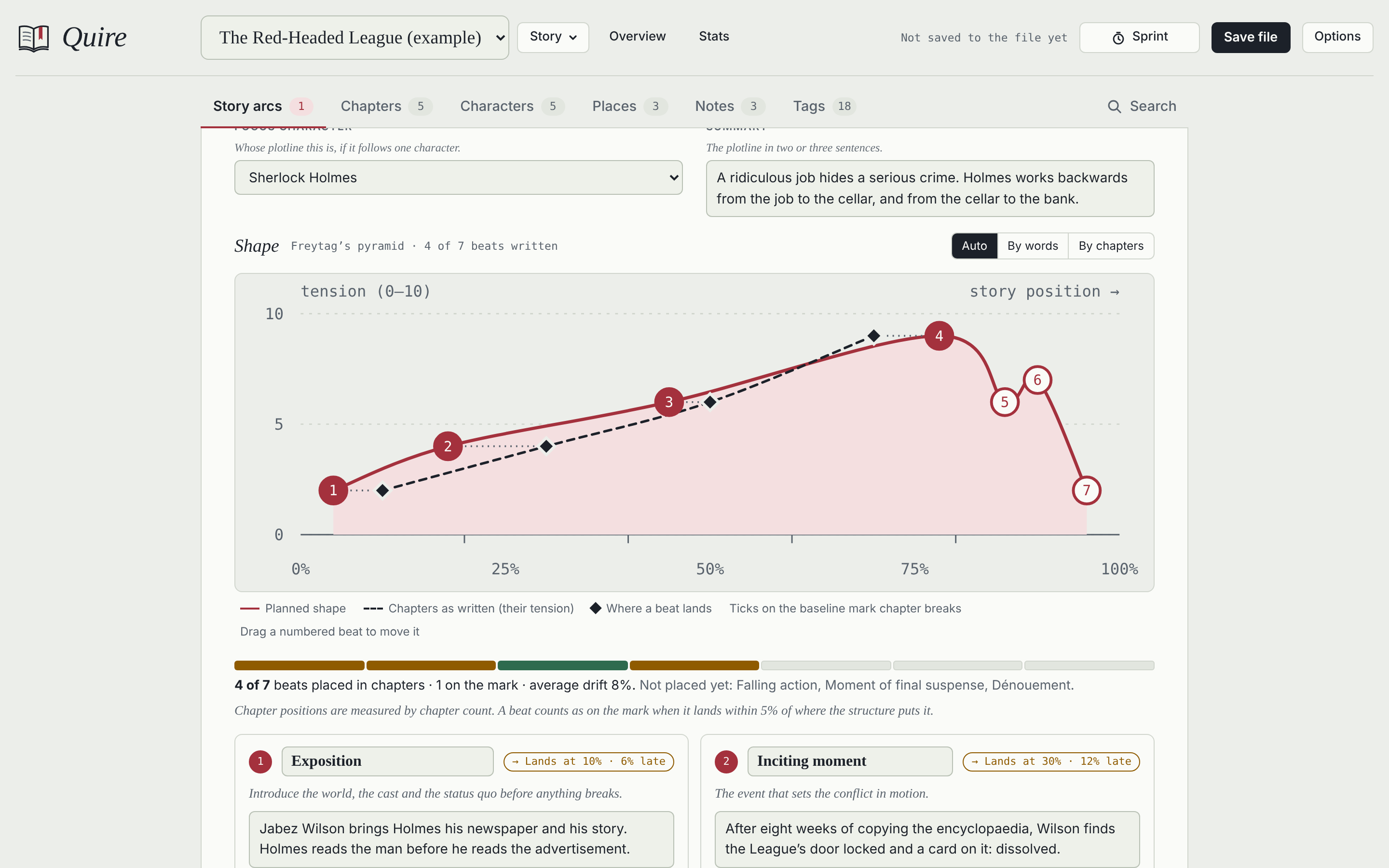
- Story arcs on a tension curve, built from classic structures and checked against your chapters
- Links between entries with
[[Title]], from a toolbar button or by typing[[, with suggestions, “also known as” names, and backlinks shown automatically - Relationships between characters, shown from both sides, in A–Z or your own order, and as a relationship map
- A planning board for each story: idea cards and cards for chapters, characters, places and notes, connected by lines, laid out as a tree on a click, and saved as an image
- Your own fields on characters, places, notes, chapters, story arcs and the story overview: one line, longer text, a choice list, a number or a date
- Story time: real dates, plain days or a calendar of your own (months, weekdays, eras, leap years), times for chapters and single scenes, and a story timeline that shows flashbacks
- A title image for each story, which can become the e-book’s cover
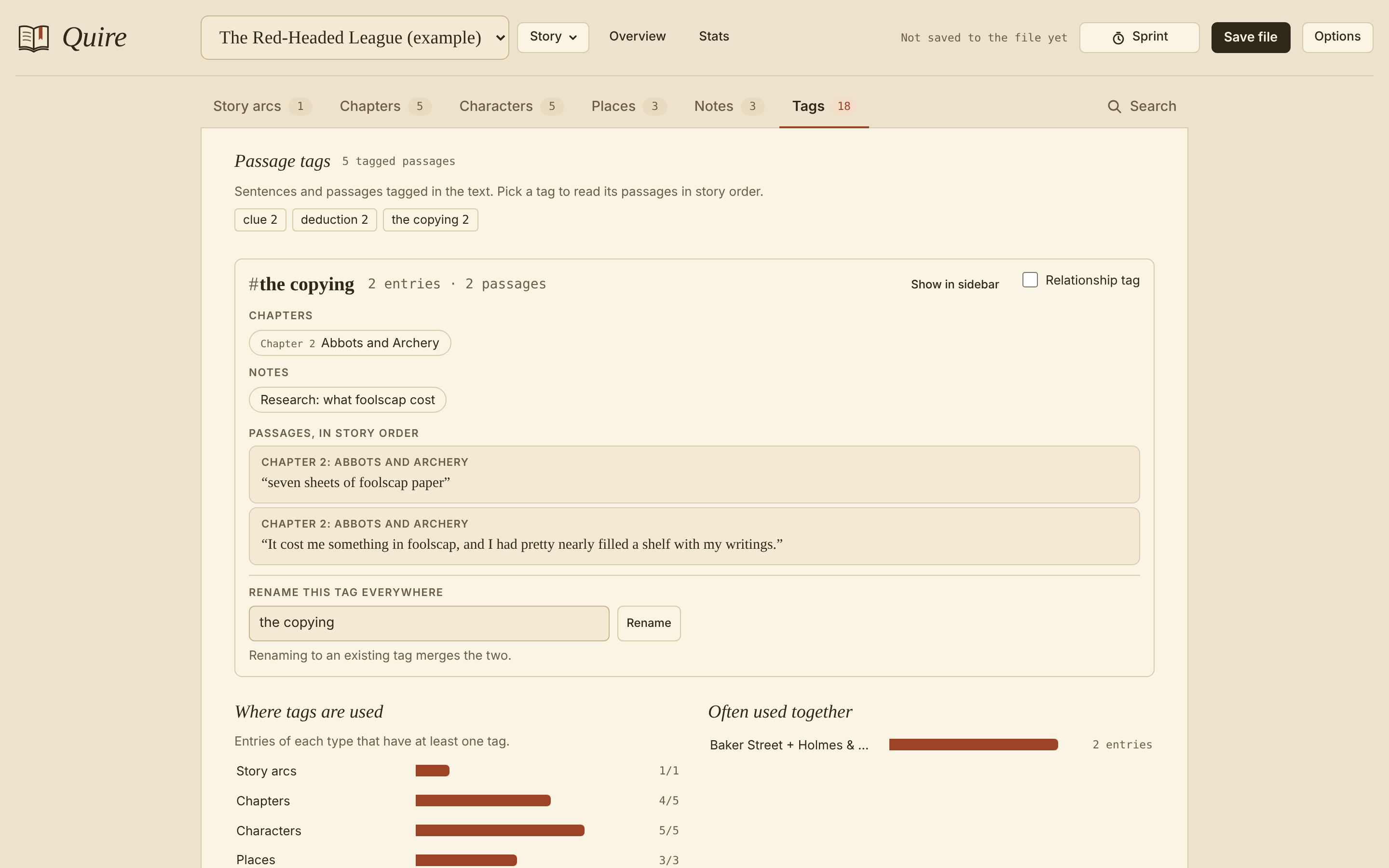
- Tags on three levels: entries, images (sorted as portrait, landscape or square by themselves) and individual passages. A passage tag lists its passages in story order, so you can follow a subplot or a clue through the book.
- Tag suggestions as you type, including chapters, characters, places and notes, which become links
- Scene labels: whose point of view each scene follows, and when it happens, and how a chapter’s words, and the whole story’s, divide between viewpoints
- Your own chapter statuses, each with a color that suits every theme, and a strip of the whole manuscript at a glance
- Chapter cards with each chapter’s synopsis, viewpoint, places and story arc beats, to drag into a new order
- Select several chapters to change their status, type, tags or time together, move them to the trash, or drag them as a block
- A cast check that lists the characters and places named in a chapter but missing from its lists
Revising
- Prose checker: Hemingway-style readability (hard sentences, adverbs, passive voice, wordy phrases), plus word echoes and dialogue
- Watch words: list habits to avoid or facts to keep straight, and a quiet note appears beside the line when you type one
- Comments on any passage, also while reading the whole manuscript straight through in read-through mode
- Stats from basic to in-depth, in sections that fold, with gauges where a value has a natural range: daily progress, dialogue share, sentence rhythm, word variety, reading level, sentence openers, punctuation, repeated phrases, the walls of text in your manuscript and a narration check
- Voices: compare how your viewpoint characters narrate against the whole manuscript, with their favorite words and phrases, rhythm, the senses they lean on (add your own sense words, or leave misleading ones out), and how a voice changes from chapter to chapter; mark who says each line and tag passages as a character’s thoughts, and compare how your characters speak and think too
- Review rounds: send a story for review as a Quire file, or bring in a Word file with tracked changes. Each changed chapter becomes a draft to merge change by change, and nothing replaces your text without a click.
Saving and sharing
- Export the manuscript as a Word manuscript in standard format for submissions, a regular Word document with real headings, an e-book (EPUB) for e-readers and reading apps, a web page, Markdown or plain text, or print it or save it as PDF. The Word document, e-book and web page include your dedication, epigraph, acknowledgments and about the author.
- Import chapters from Word (.docx), keeping italics, scene breaks, images and comments, or from text and Markdown files
- Optional AO3 sharing: copy a chapter for AO3 in one click and open the right page there
- Backups of one story or all of them, optionally encrypted
- Trash: deleted chapters, sheets, notes and whole stories wait there for 30 days, and come back with all their links
- An optional password on the saved file itself
Built-in help, with search, explains every feature, and the tutorial walks through the core features and settings with screenshots.
Screenshots
| Intense focus, with a sprint running | A story arc on its tension curve |
|---|---|
 |
 |
| A passage tag, followed through the story | On a phone |
 |
 |
Browsers
Current Firefox, Chrome, Edge and Safari, on desktop and phone (Firefox 113, Chrome and Edge 111, Safari 16.4 or later). The Prose checker’s highlights need Firefox 140 or Safari 17.2 or later; everything else works without them.
Quire needs JavaScript, which browsers allow by default. If you use a blocker such as NoScript, allow it for the file; it runs only on your own device.
Questions
Is it really just one file? Yes. The page, the styles and the program are all inside quire.html (about 1,020 KB empty). Your stories, images and history are stored in the same file when you save.
Can I use it on more than one computer? Yes: save, take the file with you, and open it there. Use one copy at a time, so that two copies don’t drift apart.
What about the example story? It holds two chapters of “The Red-Headed League” by Arthur Conan Doyle (1891), from Project Gutenberg, which are in the public domain. The outlines, sheets, notes and tags around them were written for the example. Delete it from the Story menu whenever you like.
How was Quire made? With the help of Claude, Anthropic’s AI assistant.
What can the file connect to?
- Google Fonts, only if you switch them on (Options → Look), to load typefaces.
- Pages you open yourself: a link you click, or the AO3 page that AO3 sharing opens in a new tab.
- Nothing else. A security rule at the top of the file (a Content-Security-Policy) tells your browser to block every other connection. Web addresses you may spot inside the file, such as
schemas.openxmlformats.orgorwww.idpf.org, are names the Word and e-book formats require as labels; nothing ever connects to them.
Feedback
Found a bug or have an idea? Open an issue. For bugs, say which browser and system you use and whether you work in the downloaded file or the online version. Please don’t paste private writing into issues.
License
MIT. The example story’s text is in the public domain.